Welcome to The Real Blogger Status - Beta. Please note the warnings (as of 6/13: 0 active), and the alerts (as of 1/10/2007: 5 active).

Please be aware of the naming variances in this blog. You will find various references to "Classic" / "Old Template 2006" Blogger, and to "Beta" / "New Template 2006" Blogger.
Showing posts with label Experiences. Show all posts

Wednesday, January 31, 2007

Google Custom Domain - Case Study #2

I've been working with Google Custom Domains for several weeks now, first on other peoples domains, then some on my own, and finally on more of other people. In very few cases can someone get a custom domain to work completely.

We'll take my church blog as an example here, as we did with Case Study #1. This blog has 4 aliases.

  1. http://martinezumc.blogspot.com/
  2. http://www.martinezumc.blogspot.com/
  3. http://martinezumc.org/
  4. http://www.martinezumc.org/


Current DNS settings


Simply one "CNAME" pointing to "ghs.google.com". No "A" record, as discussed in Google Custom Domain - The DNS Referral.

Let's test what we have now.
C:\>ping martinezumc.org

Pinging ghs.l.google.com [66.249.81.121] with 32 bytes of data:

Reply from 66.249.81.121: bytes=32 time=124ms TTL=244
Reply from 66.249.81.121: bytes=32 time=126ms TTL=244
Reply from 66.249.81.121: bytes=32 time=123ms TTL=244
Reply from 66.249.81.121: bytes=32 time=143ms TTL=244

Ping statistics for 66.249.81.121:
Packets: Sent = 4, Received = 4, Lost = 0 (0% loss),
Approximate round trip times in milli-seconds:
Minimum = 123ms, Maximum = 143ms, Average = 129ms

C:\>ping www.martinezumc.org

Pinging ghs.l.google.com [66.249.81.121] with 32 bytes of data:

Reply from 66.249.81.121: bytes=32 time=126ms TTL=244
Reply from 66.249.81.121: bytes=32 time=124ms TTL=244
Reply from 66.249.81.121: bytes=32 time=126ms TTL=244
Reply from 66.249.81.121: bytes=32 time=122ms TTL=244

Ping statistics for 66.249.81.121:
Packets: Sent = 4, Received = 4, Lost = 0 (0% loss),
Approximate round trip times in milli-seconds:
Minimum = 122ms, Maximum = 126ms, Average = 124ms


Both "martinezumc.org" and "www.martinezumc.org", verified by pinging, pointing to "ghs.google.com".


I can publish to martinezumc .org with no problem


I cannot publish to www. martinezumc .org.


And once again, the infamous
Another blog is already hosted at this address

And here, for reference, is a DNS Report for martinezumc.org.

(Edit 2/7): Blogger Employee promises us
We're working on a fix for the current problem some users experience when switching between custom domains and Blog*Spot.


(Edit 2/12): Blogger Employee understands the frustration.

>> Top

Wednesday, January 17, 2007

New Blogger - And The Confusion

I have two Google (New Blogger) accounts, and half a dozen active Blogger (old Blogger) accounts, that I use for maintaining my collection of a couple dozen Blogger blogs. Thanks to the New Blogger owner account policy, that's not likely to improve in the near future.

Or at least before I finish migrating my blog collection.

On the computers I use the heaviest, I'm not likely to log out for days, or maybe weeks. Windows XP is stable, and one computer stays powered up 7 x 24 x never-off. So I don't frequently log in or out of Blogger, Old or New.

Thankfully, when I do login, I have my array of blogs to see in my dashboard. Sometimes, I login, by intention, to Old Blogger, and the login script grabs an old cookie and logs me in to New Blogger. Other times, vice versa. But whenever I do get logged in to the wrong version of Blogger, and see the wrong blogs, I know what's happened.

Those folks who don't have a huge array of blogs, maintained by an array of accounts, will get confused when they login to one account and get another. They see no blogs listed, and think

Oh No! My blog is gone!
Fortunately, it's not gone, you're simply in the wrong account.

But were it not for the folks who have reported the confusion, I know that the times I have logged in to the wrong account, I would have panicked too. It's not a great feeling. It's kind of like being at work very early in the morning, before getting coffee, your mind in a fog, and walking in to the wrong restroom. And then you have to pray that there is nobody else at work, in the room, when you walk in. In the wrong circumstances, you can be in trouble, so I've heard.

And when it happens to you, recovery is simple.If it happens again, or repeats later, look for a security or software problem on your computer.

>> Top

Monday, January 15, 2007

Google Custom Domain - Case Study #1

OK, Chuck. Time to put your money where your mouth is.


I've been writing about Google Custom Domains for almost a week now.

So, it's time to test what I've learned.

(Note): This post has been migrated to The Real Blogger Status: Google Custom Domain - Case Study #1, and has been substantially expanded in The Real Blogger Status: Diagnosing Problems With Custom Domains, and in the series The Real Blogger Status: Custom Domains Diagnoses.

This case study uses my church website, martinezumc.org, with DNS service provided by GoDaddy. So, I logged in to the GoDaddy control panel, and followed the Google GoDaddy instructions (instructions for other hosting services are also in that document). Steps 1 - 4 were on target. So, I document below Steps 5 - 7 of the instructions, which became my steps 1 - 8.

Note that GoDaddy is simply the example that I use here. Blogger provides How do I create a CNAME record for my custom domain?, which provides instructions for half a dozen different popular DNS Hosting companies.

Step 1

The Default GoDaddy Settings


Here we see all DNS entries created by GoDaddy, when "martinezumc.org" was setup originally. All entries point to GoDaddy, using an "A" record equating "@" (the domain root) to "68.178.232.100".

Step 2

Just 2 Quick Changes


  1. I deleted the "A" record pointing the domain to GoDaddy.(See Note 2, below)
  2. I added a "CNAME" record equating "www" to "ghs.google.com".
For more detail about DNS records, see PCMagazine Definition of: DNS records, or FAQs.Org: How DNS Works.
(Note 1): This example is for a domain setup for the ".org" TLD, and using GoDaddy as the registrar. All experience so far indicates that the different TLDs (.com, .info, .net, .org, ...), and the different registrars (like GoDaddy) have different rules. Be careful here, and ask questions in Blogger Help Group: How Do I?, if anything here is not completely clear to you. We are still learning the details, and I suspect Blogger staff is too. If you have any doubt about the effectiveness of your DNS setup, execute Step7 below, and proceed only when you get similar results.
(Note 2): If you have an existing website with other content, and just want to add the blog as "blog.mydomain.com", don't delete the "A" record. Just add a "CNAME" record equating "blog" to "ghs.google.com".

Step 3
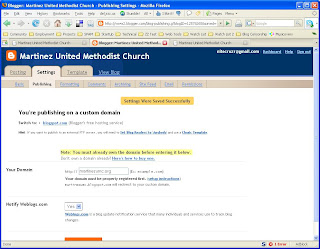
I Setup Blog Publishing


I went into Settings - Publishing for the blog currently published at "martinezumc.blogspot.com", selected "Switch to: Custom Domain", and set it to publish to "martinezumc.org". Note that it clearly warns us
martinezumc.blogspot.com will redirect to your custom domain.
with no mention of www.martinezumc.blogspot.com. This makes it unlikely that we should expect "www.martinezumc.org" to work.

Step 4

I Tested martinezumc .org


Success!

Step 5

I Tested www .martinezumc .org


Here we see just what I predicted, in Step 3, above.

Step 7
And to verify the GoDaddy setup (and diagnose the 404), a simple set of ping tests.
C:\>ping martinezumc.org

Pinging ghs.l.google.com [64.233.179.121] with 32 bytes of data:

Reply from 64.233.179.121: bytes=32 time=94ms TTL=242
Reply from 64.233.179.121: bytes=32 time=92ms TTL=242
Reply from 64.233.179.121: bytes=32 time=94ms TTL=242

Ping statistics for 64.233.179.121:
Packets: Sent = 4, Received = 4, Lost = 0 (0% loss),
Approximate round trip times in milli-seconds:
Minimum = 92ms, Maximum = 94ms, Average = 93ms

C:\>ping www.martinezumc.org

Pinging ghs.l.google.com [66.249.81.121] with 32 bytes of data:

Reply from 66.249.81.121: bytes=32 time=94ms TTL=242
Reply from 66.249.81.121: bytes=32 time=93ms TTL=242
Reply from 66.249.81.121: bytes=32 time=96ms TTL=242

Ping statistics for 66.249.81.121:
Packets: Sent = 4, Received = 4, Lost = 0 (0% loss),
Approximate round trip times in milli-seconds:
Minimum = 93ms, Maximum = 96ms, Average = 94ms


And there is a demonstration of the dynamic name resolution of "ghs.google.com".
64.233.179.121
hs-in-f121.google.com
66.249.81.121
bx-in-f121.google.com


And, seeing as "www.martinezumc.org" resolves properly, in this example to "66.249.81.121", we can conclude that the 404 above is coming from Google, not GoDaddy.

The host named "ghs.google.com" is a load balanced server array. It's provided to give your readers the best performance possible, when visiting your blog.


And, last but by no means least, the DNS Report for "martinezumc.org".

Please follow me now to the next post in this series.

>> Top

Thursday, December 28, 2006

Publishing Externally? Here's What You Get

Every day now, you see the question

I just upgraded my account and blog to New Blogger. Where is my Layouts template / my Label list / my link to Upgrade my template?

and you look at the blog URL (when it's included), and it's not yourblog.blogspot.com.

And the answer is always that, when you publish externally (aka FTP publishing), you don't get any of those features. New Blogger 2006 requires publishing to blogspot.com, for maximum benefit.

The New Blogger 2006 Blog*Spot servers publish the blog as the reader retrieves each page. They don't publish static HTML, they publish dynamic XML. When you publish by FTP, Blogger is copying old static HTML code to your FTP server. HTML won't get you
  • Improved Archives, with multiple selectable views, and individual titles.
  • New Layouts template, with GUI configured page elements.
    • Feeds.
    • Labels.
    • Linklists.
  • Improved Main Page view, multi-paged, with each page limited in size by the "Show days / posts" setting.
  • Improved Template editor, with scripted save and restore of template code.
  • The ability to require authentication, and to designate readers, to view the blog. Any blog published by FTP is open to view by all.
What it will get you is
  • Authentication by Google account.
  • Labels for the posts. You can use the labels in various ways, without the Layouts template based Label page elements.
    • Make your own Label lists, from the labels shortcuts after each post.
    • Select a label shortcut after a post, and view all posts with that label, in a single page Main Page view.
  • Improved Edit Posts menu, again with labels.
  • The new, more stable Blogger.
  • The shiny new Navbar (that you can continue to turn off).
  • The continued spinner of death, when you publish (sorry, but static publishing will continue to have this).
  • Your own, externally published website, that you can control (though not protect) as you see fit.
  • A domain name that you can choose. This may not be exclusive to external publishing.


Nor can you have private blogs. See Settings - Publishing.
Hint: If you want to publish to an external FTP server, you will need to Set 'Blog Readers' to 'Anybody' and use a Classic Template.


Now, if the above issues are a problem for you, but you don't want your blog hosted on Blog*Spot, check out Google Custom Domains. Read my case study, and read about the possible complications, too.

Tuesday, December 26, 2006

Logging In To Blogger

With the coming of New Blogger, logging in to the right account (Old / New) should be more straightforward.

  1. Clear cache and cookies, and restart your browser.
  2. Login using the new, improved Blogger Login screen.


You'll have separate, well defined choices.
  1. Old Blogger, using your Blogger account.
  2. New Blogger, using your Google account.
Make the choice wisely. Blogs using the old template may or may not be visible and accessible from New Blogger, and vice versa. If you login, and your blog isn't listed, or if listed isn't accessible, then logout, and login again carefully.

But the first time that you use the new login procedures, be sure to clear cache and cookies, first. Blogger appears to be reusing addresses, cookies, and scripts, even though they are providing a new set of servers ("www2.blogger.com", instead of "beta.blogger.com", for instance). If one of your cookies continues to point your browser to "beta.blogger.com", guess what will happen?

No, I can't say for sure. But I'll bet that you're not as likely to see your dashboard, when it does.

Start cleanly, and clear cache and cookies, before you login to The New Blogger for the first time.

Wednesday, December 20, 2006

How Long Should Migrating A Blog Take?

My baseline test set, Nitecruzr68, which is basically a stub blog, took close to 2 hours. Other Bloggers are reporting longer times, some days.

I'll bet that size of blog will make a big difference. So if it takes 2 hours to migrate a stub blog with 1 post, how long will it take to migrate PChuck's Network?

Jordan, you're going to need a migration estimation tool of some sort, and some sort of progress indicator. Try importing a blog (any blog) from Blogger to WordPress, and see what I'm talking about.

Please.

The need for a migration time estimation, and / or a migration progress indicator, is now added to my wishlist. Let Blogger know that a Migration Support tool is needed.

Migration Support Tool: Provide an estimate of time required for any blog to be migrated (before migration starts), AND a migration progess indicator (while migration is in progress).

http://help.blogger.com/?page=wishlist

Here's a 10 minute thread sample from Blogger Help Group: Something Is Broken - several very unhappy Bloggers.


(Edit 12/20 15:00): My bud just asked me, in email
Well, I can't recall that Blogger has given out any numbers, so how does one know???

And my answer was
That's so easy. Go "Next Blog" surfing.

Just hit "Next Blog" a couple dozen times. I did, and counted about 10 Old, and 10 New, blogs. And 2 with NO Navbar (assholes).

Now of those 10 New Blogger blogs, how many were migrated, and how many were started as Beta / New blogs? I'll bet as many were started as Beta, as were migrated. And of those migrated, how many are large and complex blogs? See my migration discussions, and see Roberto's migration discussions.

I don't think we've even seen the tip of the iceberg yet. And Jordan says
...spread the word that account migrations sometimes takes longer than a few minutes :)

Well no shit Sherlock!

Tuesday, December 19, 2006

The Name Has Changed

but the game remains the same. I just wish that I knew what the rules are.

Pete, in Blogger Buzz: The New Version of Blogger, writes

The new version of Blogger in beta is dead!
Long live the new version of Blogger!


So this is now "New Blogger", not "Beta Blogger". Well, I will call it "New Blogger 2006", as I know that, in 2007, 2008, or sometime in the future, there will be a second New Blogger. And New Blogger 2006 replaces "Classic" or "Old Template 2006" Blogger.

Even though this is now "New Blogger 2006", and it replaces "Old Template Blogger 2006", you will find numerous references to "Classic" and "Beta" Blogger here and there. This blog will always be titled and addressed as The Real Blogger Status - Beta.

(Edit 12/20): And in commemoration of the new name, we now have Real Blogger Status - New. (p.s.) Does anybody remember New Coke?

Saturday, October 14, 2006

Authentication - And Confusion

One of the long awaited features in Blogger Beta was the ability to restrict access to your blog. Designating your blog as private, to be read by authorised parties only, was a much requested feature.

Blogger Beta uses your Google account to identify you, and verify that you are authorised to view any blog (including yours). And that causes occasional concern, fortunately unnecessary in this case. Seeing your Google account, which coincidentally may be the same as your email address, as you peruse your blog, is a bit scary.

Rest assured, though, as you see your email address in your Navbar, every visitor to your blog is seeing their own email address in their Navbar. Nobody else sees your email address.

And if you're seeing an increase in spam recently, rest assured that it's not related to your Blogger Beta account, or your Google account, being visible to spammers.

  • Improved spam filtering requires increased spam volume, in order to allow the spammers to maintain a constant income level.
  • Increased availability of bots makes the increased spam volume possible.
None of this, unless your computer has become part of a botnet, is related to anything that you have or haven't done.

Relax just a bit. Concentrate on other, more urgent, issues - like the coming Beta migration. But accept the inevitable - you will need a Google account to use Blogger.

Your (Blogger) Google account, and your (GMail) Google account don't have to be the same, though. Google accounts are free, and you can set up another, if you like.

(Note 2/13): As noted by Pete in his separate comment, your email address is kept private, by carefully designed code:
The iframe separation keeps arbitrary Blog*Spot blogs from reading (for example) your Google Account e-mail address when you're logged in.


>> Top

Thursday, September 14, 2006

Beta Evaluation

Today is September 16. I made my first post in this blog on August 16, so this is my one month evaluation.

The Good


  • Labels.
  • Archives, to replace Previous Posts.
  • The Page Layout editor / GUI Template.
  • The improvedTemplate editor.
  • Private blogs, requiring authentication.
  • The improved Main Page view.
  • The improved Edit Posts screen.
  • Various minor tweaks.
    • The Edit Posts screen lets you page forward and backwards, when there are more posts then will fit on the maximum requested posts screen.
    • The post editor actually highlighted an error, in addition to saying that I had made one.
    • Instant publishing - no spinner of death.


The Bad


The Ugly


The Good

Labels
If I was to pick one feature which would keep me in a Beta Blog, it would be Labels. The ability to associate posts by keyword, dynamically, is useful. Just that. But take that ability, and generate a custom main page view, of all posts with that keyword. Way more than useful. Very user friendly.

Archives
The old 10 Previous Posts list is no more, it's been integrated with the archives.

The Page Layout (aka Page Elements) Editor
The ability to customise 75% (my guess) of all blog features, using a GUI process, is a big relief. The template editor is not very user friendly. But defining commonly used features in a GUI process, and letting us change their characteristics, goes a long way towards making the template editor unnecessary.

Just moving elements within the page is a major improvement. Want a link list at the top of the sidebar? Grab it, drag it, and drop it. Want to change colours and / or fonts? We now have a standardised setting process for that. No more "Why did that change size?").

The slightly improved Template editor.
The template editing process, while substantially like the old, helps you to save and restore your current template, using a GUI process. This will encourage each of us to save our templates more readily, which will reduce stress level when editing templates, which may reduce mistakes. I know that it will for me. Plus we can make smaller changes, leading to more understanding of what we are doing, and possibly less mistakes.

And a possibility for endless activity - template HTML now supports Javascript. I am just getting in to this - but there is real potential for pushing into new territory.

Authentication
Using a Google account / password to authenticate ourselves allows blogs to be made private for viewing, as well as for adminstration. And it integrates well with the menu of blogs (ie "dashboard") under our control.

The Improved Main Page View
Under Classic Blogs, you could have 2 views - main page, and article. You could have an article view of any specific post, but you could have a sequential ("main page") view of only the latest 10 (or whatever number the blog owner determined) posts. If the articles of interest weren't in that latest x number, it was time to look by post name. Oh yes, there was no post name list (excepting of course the 10 previous posts). Good luck finding a post by title!

Now, your main page view is unlimited. The limitation simply affects how many in a single view - when you get to the end of the page, just hit "Newer" or "Older". And integrating Label search results into main page view makes it great.

The Vastly Improved Edit Posts Screen
Start with the first improvement that I saw weeks ago. When you peruse the Edit Posts list, if you decide upon a limit of 50 posts, that's now just 50 posts on the first screen. More than 50 posts? Hit "Older" ("Newer").

And it gets better. All posts are listed, with their Labels. Want a comprehensive list, by post, of all labels used? Here it is.

And in another column is a master list of all labels. If you click on one, the list of posts shows all posts for that label. And each post listing all labels for that post. Want a labels cross-reference? Here it is.

And we have ability to select listed posts, and then to add or remove a selected label. Need to change one label for another? Here's a list to do this from, quite painlessly.

And a minor (but not very much so) item. For each post with Comments, you get a link to view the comments for that post.

Various Minor Tweaks
A nice experience here. I actually went to Publish a post, and was told that I was missing an opening "<a>" (unbalanced "</a>"). The difference here was that it highlighted the offending "</a>"!

The spinner of death is no more. When you Publish a post, or edit the template, your changes save instantly. No more waiting. YAY!

The Bad

Feeds

Authentication

Publishing To External Servers

Post Summaries

There's No Going Back, Folks!

Not all features are available to blogs that are published externally (aka FTP blogs).

>> Top