
Showing posts with label Custom Domains. Show all posts
Showing posts with label Custom Domains. Show all posts
Tuesday, April 24, 2007

Sunday, April 22, 2007
Custom Domains Aren't For Everybody
OK, maybe you tried your custom domain, and decided it's not for you.
Go to Settings - Publishing, and select
Switch to: • blogspot.com
That's all that it takes, normally. Well, that and refreshing cache afterwards.
>> Top
Thursday, March 29, 2007
Google Custom Domains - Elegant Yet Unreliable
Google Custom Domains are a simple solution for providing non-Blog*Spot URLs for blogs published on Blogger servers. They are very elegant in their design, which uses nothing special, just industry standard DNS referrals ("CNAME") to a load balancing DNS server. Neither the "CNAME" entry (on the server provided by the DNS registrar), nor the load balancing ("ghs.google.com") are anything innovative.
And that's what makes them so elegant.
But, there's a downside - they don't work, consistently. And the cases where they don't work are inconsistently similar to those cases where they do work.
- The DNS provider is one major weakness which is not, totally, Google's fault. Not all DNS registrars support "CNAME" referrals - some only support "A" referrals. Not all support staff, working for the registrars, know how to implement "CNAME" either. GoDaddy supports it, and their "Total DNS Control" wizard will let you create a "CNAME". But the process is confusing, and more than one hopeful Blogger has reported being told, when contacting GoDaddy personally, to use an "A" record.
- When attempting to publish a blog, after the proper "CNAME" referral has been setup and verified, the Blogger may see the monolithic error
Another blog is already hosted at this address.
- After publishing the blog successfully, to say "mydomain.com", the Blogger will frequently find that "www.mydomain.com" won't respond with the same content (generally, a 404 error is observed). This is in spite of the fact that
- With normal publishing to Blog*Spot, "www.myblog.blogspot.com" will, reliably, equal "myblog.blogspot.com".
- With Custom Domain publishing, "myblog.blogspot.com" will redirect to "mydomain.com", and "www.myblog.blogspot.com" will show the same content as "mydomain.com" (though remaining on "www.myblog.blogspot.com").
- Even when none of the above problems are observed, the various blog aliases publish asymmetrically, in a way that must be demonstrated, to be effectively explained.
- With the asymmetric publishing results, many Bloggers have found their search weights, and Page Ranks, dramatically reduced. This does not make them cooperative for further analysis.
- Having observed some or all of the above symptoms, some Bloggers try using a version of URL referral, sometimes when recommended by their DNS registrar. URL referral produces even more bizarre results, and still worse search weights and Page Ranks.
Not all Bloggers experience all of the above. Some Bloggers do, successfully, publish to a Custom Domain, with all 4 aliases showing identical content, though the "www.myblog.blogspot.com" irregularity is still normal. It's seldom that these cases are identified, though, as Bloggers with no problems seldom post in Google Blogger Help.
This needs to be fixed - tell Blogger that this is stupid.
>> (Update 6/6): Blogger is aware of our concerns, and may be working on the problem.
>> Forum thread links - Inconsistent or unsuccessful: bX-*00023
>> Forum thread links - Complete success: bX-*00024
>> Copy (either of) these tags: bX-*00023 bX-*00024
>> Top
Wednesday, February 14, 2007
Publishing Externally? Republish To Blog*Spot Before Publishing To A Custom Domain
If you're currently publishing your blog externally, because you want to use a non-Blog*Spot address, you may have looked at your friends who are now publishing to a Google Custom Domain, and envied all of the shiny features in New Blogger that they can now use.
(Note): This post has been migrated to (and improved in) The Real Blogger Status: Publishing Externally? Republish To Blog*Spot Before Publishing To A Custom Domain.
Now publishing externally was how you got to use a non-Blog*Spot address for your blog, under Old Blogger. But with New Blogger, and the HTML served dynamically, blogs published externally couldn't use all of the features. So Blogger developed Custom Domains, where the blogs could be published to the Google servers (enabling dynamic HTML), and use externally hosted DNS to point a non-Blogger domain into the Google servers (enabling non-Blog*Spot addresses).
Let's say that you have a blog, published to a section of your website, as "mydomain.com\blog".
- Setup the rest of your website, to point to your blog as "myblog.mydomain.com".
- As I describe in Custom Domain setup Step2, point "myblog.mydomain.com" to "ghs.google.com".
- Republish your blog back to Blog*Spot, let's say as "myblog". Go to Settings - Publishing, select Blog*Spot Address, and provide "myblog" for the Blog*Spot Address.
- As I describe in Custom Domain setup Step3, now publish your Blog*Spot blog "myblog" to "myblog.mydomain.com", on Google servers.
If you only have your blog, and nothing else, the task is a bit simpler.
- Republish your blog back to Blog*Spot, let's say as "myblog". Go to Settings - Publishing, select Blog*Spot Address, and provide "myblog" for the Blog*Spot Address.
- As I describe in Custom Domain setup Step3, now publish your Blog*Spot blog "myblog" to "myblog.mydomain.com", on Google servers.
The key step here is that your blog has to be hosted on Blog*Spot, before a Custom Domain forwarding can be successfully setup. Your Blog*Spot URL ("xxxxxxx.blogspot.com") will forward, automatically, to your custom domain. This saves those with an established blog at "xxxxxxx.blogspot.com" from losing that address to sploggers.
Complicated? Not really. Just take it one step at a time. Just pray that you don't get the old monolithic error
Another blog is already hosted at this address.
>> Forum thread links: bX-*00028
>> Copy this tag: bX-*00028
>> Top
Sunday, February 11, 2007
Google Custom Domain - The DNS Server Definition
Of the confusion surrounding definition of Google Custom Domains in DNS, second only to the confusion about the DNS Referral definition, is the DNS Server definition.
(Note): This post has been migrated to (and improved in) The Real Blogger Status: The Google Custom Domain Setup - The DNS Server Definition.
Google does not provide the name servers needed for Google Custom Domains to work - the name servers must be provided by your registrar. The name servers are indicated by "NS" records, pointing to 2 - 8 servers owned by the registrar. You do not change the "NS" records.
The "NS" records point to the DNS servers provided by your DNS hosting company. You pay for the DNS hosting service, and the DNS hosting company sets up the "NS" records, on your behalf.
The name servers, provided by your registrar, are where the domain definition records, such as "A" (Address), "CNAME" (Canonical Name), and "MX" (Mail Exchange), among others, are stored. You have to provide a "CNAME" record on those servers, with that "CNAME" record pointing to "ghs.google.com", for your blog to be referenced as part of a Google Custom Domain.
>> Top
Friday, February 09, 2007
A Tale Of Two Domains
Blogger rolls on, and upgrades their product in silence. Here we see another example of that process.
We're going to examine two blogs - MartinezUMC and ToaCx4. We'll start with excerpts from the ever useful DNS Report, provided (free) by DNS Stuff.
martinezumc .org
The relevant portion of the DNS Report for the domain for my church blog, previously examined in my Case Study #2.
toacx4 .info
The relevant portion of the DNS Report for the domain for JaceMan's blog "toacx4".
Next, the ever available "ping" command, to test name resolution.
C:\>ping martinezumc.org
Pinging ghs.l.google.com [64.233.179.121] with 32 bytes of data:
Reply from 64.233.179.121: bytes=32 time=92ms TTL=244
Reply from 64.233.179.121: bytes=32 time=92ms TTL=244
Reply from 64.233.179.121: bytes=32 time=94ms TTL=244
Reply from 64.233.179.121: bytes=32 time=92ms TTL=244
Ping statistics for 64.233.179.121:
Packets: Sent = 4, Received = 4, Lost = 0 (0% loss),
Approximate round trip times in milli-seconds:
Minimum = 92ms, Maximum = 94ms, Average = 92ms
C:\>ping www.martinezumc.org
Pinging ghs.l.google.com [66.249.81.121] with 32 bytes of data:
Reply from 66.249.81.121: bytes=32 time=94ms TTL=244
Reply from 66.249.81.121: bytes=32 time=92ms TTL=244
Reply from 66.249.81.121: bytes=32 time=93ms TTL=244
Reply from 66.249.81.121: bytes=32 time=93ms TTL=244
Ping statistics for 66.249.81.121:
Packets: Sent = 4, Received = 4, Lost = 0 (0% loss),
Approximate round trip times in milli-seconds:
Minimum = 92ms, Maximum = 94ms, Average = 93ms
C:\>ping toacx4.info
Ping request could not find host toacx4.info. Please check the name and try again.
C:\>ping www.toacx4.info
Pinging ghs.l.google.com [66.249.81.121] with 32 bytes of data:
Reply from 66.249.81.121: bytes=32 time=93ms TTL=244
Reply from 66.249.81.121: bytes=32 time=92ms TTL=244
Reply from 66.249.81.121: bytes=32 time=106ms TTL=244
Reply from 66.249.81.121: bytes=32 time=93ms TTL=244
Ping statistics for 66.249.81.121:
Packets: Sent = 4, Received = 4, Lost = 0 (0% loss),
Approximate round trip times in milli-seconds:
Minimum = 92ms, Maximum = 106ms, Average = 96ms
Finally, we'll load all 4 aliases for each blog.
We see a major difference in functionality here. The first, "martinezumc.org", loads its custom website properly for the root only, but not for "www.martinezumc.org". The second, "toacx4.info", loads the website properly for both the root and "www.toacx4.info".

martinezumc .blogspot .com
http://martinezumc.blogspot.com/, which redirects to http://martinezumc.org/

www .martinezumc .blogspot .com
http://www.martinezumc.blogspot.com/

martinezumc .org
http://martinezumc.org/

www .martinezumc .org
http://www.martinezumc.org/ is a 404 at Blogger

toacx4 .blogspot .com
http://toacx4.blogspot.com/, which redirects to http://www.toacx4.info/

www .toacx4 .blogspot .com
http://www.toacx4.blogspot.com/

toacx4 .info
http://toacx4.info/, which redirects to http://www.toacx4.info/

www .toacx4 .info
http://www.toacx4.info/
So why did I refer to The Silence, here? Because less than a week ago, we were told that .info TLDs cannot be used with Custom Domains.
(Edit 2/9 21:00): In custom domain with 1 & 1 hosting, we see the same situation with Cool Looking Stuff as with Martinez UMC.
- http://cool-looking-stuff.blogspot.com/
- http://www.cool-looking-stuff.blogspot.com/
- http://cool-looking-stuff.com/
- http://www.cool-looking-stuff.com/
- DNS Report for cool-looking-stuff.com
>> Top
Google Custom Domain - The DNS Referral
Of all of the instructions in the process of setting up a Google Custom Domain for your Blogger blog, none seems to generate so much confusion as setting up the DNS Referral. The instruction itself is so simple,
Add a "CNAME" record. Point "www.yourdomain.com" to "ghs.google.com". And leave the "NS" records to be maintained by your DNS provider.
(Note): This post has been migrated to The Real Blogger Status: The Google Custom Domain Setup - The DNS Referral.
But why a "CNAME" record? And why "ghs.google.com"?
- The host "ghs.google.com" is a load balancing server array. When the reader's DNS client asks for the address of "ghs.google.com", it gets the address of whatever server is available right now.
- In order for you to refer DNS traffic for "yourdomain.com" to "ghs.google.com", rather than to "64.233.179.121" (among many possibilities), you have to use a "CNAME" record. An Address ("A") record will only point to an IP address; to point to a host name you must use a Canonical Name ("CNAME") record.
The host "ghs.google.com" then provides a specific IP address, pointing to the single server that will be used to serve your blog to this reader. Another reader for your blog will be accessing it thru a different IP address, using another server. This is called "load balancing". If one readers accesses your blog thru server "D", another reader may access it thru server "F", and a third thru server "G". If server "B" is down, "ghs.google.com" won't offer it for referral. Other readers of other blogs may be using servers "A", "C", and "E" at the same time.
Google provides a load balancing server array, to give your readers the best possible experience. Use the array, not a single server, nor a URL referral. Or prepare for complaints
Gee, your blog performance sucks.
>> Top
Thursday, February 08, 2007
Custom Domains And URL Forwarding - A Bad Idea
If you're trying to get your Custom Domain setup to work, and are frustrated (as I am) by the fact that you can't get both "www.yourdomain.com" and "yourdomain.com" to forward properly, you may have complained to your DNS provider, suspecting that the problem is one which they must resolve.
And in some cases, your DNS provider may not know how to setup a "CNAME" record. Some providers only use "A" records.
Some DNS providers will convince you to use URL forwarding, where your domain is redirected to the DNS providers servers. They set their servers to simply load any portion of the desired website ("www.yourdomain.com" or "yourdomain.com") from your Blog*Spot website ("yourblog.blogspot.com").
This will indeed load the content, as desired. There are several downsides to this "solution", though.
- Your DNS provider may have to set this up in their servers, it's possibly not a DNS setting that you can make.
- As the reader views your redirected blog, the content of the address bar in the browser will constantly indicate "www.yourdomain.com" or "yourdomain.com", with no detail about the actual URL being viewed.
- We're unsure about how well search engine spiders, and other robotic visitors, will react to URL forwarding.
- URL forwarding bypasses the load balancing provided by "ghs.google.com", and this is bad for everybody.
Blogger has admitted that Custom Domains needs work. Let's wait for them to figure out how it should be setup, at their end. Try and avoid using URL Forwarding, unless you are really desperate.
>> Top
Wednesday, January 31, 2007
Google Custom Domain - Case Study #2
I've been working with Google Custom Domains for several weeks now, first on other peoples domains, then some on my own, and finally on more of other people. In very few cases can someone get a custom domain to work completely.
We'll take my church blog as an example here, as we did with Case Study #1. This blog has 4 aliases.
- http://martinezumc.blogspot.com/
- http://www.martinezumc.blogspot.com/
- http://martinezumc.org/
- http://www.martinezumc.org/

Current DNS settings
Simply one "CNAME" pointing to "ghs.google.com". No "A" record, as discussed in Google Custom Domain - The DNS Referral.
Let's test what we have now.
C:\>ping martinezumc.org
Pinging ghs.l.google.com [66.249.81.121] with 32 bytes of data:
Reply from 66.249.81.121: bytes=32 time=124ms TTL=244
Reply from 66.249.81.121: bytes=32 time=126ms TTL=244
Reply from 66.249.81.121: bytes=32 time=123ms TTL=244
Reply from 66.249.81.121: bytes=32 time=143ms TTL=244
Ping statistics for 66.249.81.121:
Packets: Sent = 4, Received = 4, Lost = 0 (0% loss),
Approximate round trip times in milli-seconds:
Minimum = 123ms, Maximum = 143ms, Average = 129ms
C:\>ping www.martinezumc.org
Pinging ghs.l.google.com [66.249.81.121] with 32 bytes of data:
Reply from 66.249.81.121: bytes=32 time=126ms TTL=244
Reply from 66.249.81.121: bytes=32 time=124ms TTL=244
Reply from 66.249.81.121: bytes=32 time=126ms TTL=244
Reply from 66.249.81.121: bytes=32 time=122ms TTL=244
Ping statistics for 66.249.81.121:
Packets: Sent = 4, Received = 4, Lost = 0 (0% loss),
Approximate round trip times in milli-seconds:
Minimum = 122ms, Maximum = 126ms, Average = 124ms
Both "martinezumc.org" and "www.martinezumc.org", verified by pinging, pointing to "ghs.google.com".

I can publish to martinezumc .org with no problem

I cannot publish to www. martinezumc .org.
And once again, the infamous
Another blog is already hosted at this address
And here, for reference, is a DNS Report for martinezumc.org.
(Edit 2/7): Blogger Employee promises us
We're working on a fix for the current problem some users experience when switching between custom domains and Blog*Spot.
(Edit 2/12): Blogger Employee understands the frustration.
>> Top
Monolithic Errors #2
Setting up a blog, published to a Google Custom Domain, is a two step process.
- You setup DNS pointing to the Custom Domain server "ghs.google.com".
- You publish your blog to the custom domain.
But many others can't. And we all get one error, consistently.
Another blog is already hosted at this address.
What does this error mean? I suspect that Blogger is validating the DNS pointer, before setting up the relationship between the Blog*Spot blog (which is what we currently have) and the Custom Domain. And, if the DNS doesn't point to "ghs.google.com", then the custom domain must be in use somewhere else.
An alternate possibility is that there is a pointer somewhere in the Blog*Spot blog that points somewhere already. Or maybe the Blog*Spot blog can't be found.
Either way, Blogger needs to fix this problem. At least, add a few "bx-" codes, to let us know what the hell is going on, and so we can enumerate the problem in the forums.
>> Top
Saturday, January 27, 2007
The Trinity, and Your Web Site
The power and majesty of the trinity has been a part of mankind for years, before the Internet. From religion (the Christian nature of the supreme being - The Father, The Son, and The Holy Ghost), to properly robust systems, using triple redundancy (as in Robert Heinlein's science fiction - "I tell you three times that this is so"), the number three has always had almost mystical significance.
And with your web site, there is a trinity too. You are using, and may be paying (directly or indirectly) for 3 different services.
If you have a domain purchased thru GoDaddy, and hosted on their services (maybe a blog published using FTP), you may have a package deal, with all 3 services on one yearly bill. Or you could purchase (register) your domain from any of dozens of registrars, have DNS provided by another company, and host your web site on a third, like Blogger. That's your choice, based upon your needs.
All Internet service companies don't provide all 3 services. GoDaddy does. Blogger / Google provides only content hosting, if you publish your blog to a Google Custom Domain.
You can register domain names from any of a number of different registrars, and you can use .com, .org, .net or any other valid addresses. Remember: you only need to get the domain name; you don't have to pay extra for hosting service.
Registration
When you purchase your domain, you want to know beforehand that nobody is already using it. And you want to ensure that, in the future, nobody uses it. You pay for the uniqueness of your domain name.
DNS Hosting
When you pay for DNS (directory listing), you want to know that your domain can always be located. Redundant DNS servers, geographically separated, is important for high visibility web sites. You pay for the address listing of your domain name.
Now this little detail may not be important to you.
Chuck, this doesn't matter to me. I pay my ISP for service, and they tell me to configure "ns1.myisp.com" and "ns2.myisp.com" (or their IP addresses) as my DNS servers. Why do I care about whatever DNS server Google uses?
Well, I'll ask you to think about this. You use your ISPs DNS servers so you can access websites. You pay for DNS hosting so your readers can access your website. Both your ISPs DNS servers, and your readers ISPs DNS servers, have to ask your DNS host for the address of your website.
You write your blog for your readers. Your readers DNS servers have to find out the address of your web site. How many repeat readers do you expect to have, if they try to access your web site and see
404 Server Not Availableor a similar error?
Content Hosting
When you pay for Content Hosting, you want to know that your web site itself will always be online. Whereas a DNS retrieval is a small (but significant) amount of traffic, and of server space, your blog (web site), as it grows, will use increasingly larger amounts of server space, and generate increasingly larger amounts of traffic. Your content host needs a large and reliable connection to the Internet, as well as reliable server hardware. You pay for the hosting of the web site itself.
If you have a blog hosted on Blog*Spot, you pay nothing at all. If you have a blog hosted on a Google Custom Domain, you pay nothing for the Content Hosting, just for registration and DNS.
The latter 2 services are generally billed yearly, and at a fixed rate. Content Hosting is generally billed by the month, and will be tiered based upon the amount of storage required (size of blog), amount of bandwidth generated (number of readers * size), and various server services required.
>> Top
Tuesday, January 16, 2007
Your Custom Domain Blog, And AdSense
The whole idea of Google Custom Domains for Blogger blogs is great, as it gives us most of the benefits of an externally published blog, plus the New Blogger Layouts Templates features. But there's a major flaw currently in there.
If your blog is accessed as both "www.myblog.com" and "myblog.com", this won't work. AdSense appears to be sensitive to this problem. Tell Blogger that this is a major problem.
>> Top
Monday, January 15, 2007
Google Custom Domain - Case Study #1
OK, Chuck. Time to put your money where your mouth is.
I've been writing about Google Custom Domains for almost a week now.
So, it's time to test what I've learned.
(Note): This post has been migrated to The Real Blogger Status: Google Custom Domain - Case Study #1, and has been substantially expanded in The Real Blogger Status: Diagnosing Problems With Custom Domains, and in the series The Real Blogger Status: Custom Domains Diagnoses.
This case study uses my church website, martinezumc.org, with DNS service provided by GoDaddy. So, I logged in to the GoDaddy control panel, and followed the Google GoDaddy instructions (instructions for other hosting services are also in that document). Steps 1 - 4 were on target. So, I document below Steps 5 - 7 of the instructions, which became my steps 1 - 8.
Note that GoDaddy is simply the example that I use here. Blogger provides How do I create a CNAME record for my custom domain?, which provides instructions for half a dozen different popular DNS Hosting companies.
Step 1

The Default GoDaddy Settings
Here we see all DNS entries created by GoDaddy, when "martinezumc.org" was setup originally. All entries point to GoDaddy, using an "A" record equating "@" (the domain root) to "68.178.232.100".
Step 2
Just 2 Quick Changes
- I deleted the "A" record pointing the domain to GoDaddy.(See Note 2, below)
- I added a "CNAME" record equating "www" to "ghs.google.com".
(Note 1): This example is for a domain setup for the ".org" TLD, and using GoDaddy as the registrar. All experience so far indicates that the different TLDs (.com, .info, .net, .org, ...), and the different registrars (like GoDaddy) have different rules. Be careful here, and ask questions in Blogger Help Group: How Do I?, if anything here is not completely clear to you. We are still learning the details, and I suspect Blogger staff is too. If you have any doubt about the effectiveness of your DNS setup, execute Step7 below, and proceed only when you get similar results.
(Note 2): If you have an existing website with other content, and just want to add the blog as "blog.mydomain.com", don't delete the "A" record. Just add a "CNAME" record equating "blog" to "ghs.google.com".
Step 3

I Setup Blog Publishing
I went into Settings - Publishing for the blog currently published at "martinezumc.blogspot.com", selected "Switch to: Custom Domain", and set it to publish to "martinezumc.org". Note that it clearly warns us
martinezumc.blogspot.com will redirect to your custom domain.with no mention of www.martinezumc.blogspot.com. This makes it unlikely that we should expect "www.martinezumc.org" to work.
Step 4

I Tested martinezumc .org
Success!
Step 5

I Tested www .martinezumc .org
Here we see just what I predicted, in Step 3, above.
Step 7
And to verify the GoDaddy setup (and diagnose the 404), a simple set of ping tests.
C:\>ping martinezumc.org
Pinging ghs.l.google.com [64.233.179.121] with 32 bytes of data:
Reply from 64.233.179.121: bytes=32 time=94ms TTL=242
Reply from 64.233.179.121: bytes=32 time=92ms TTL=242
Reply from 64.233.179.121: bytes=32 time=94ms TTL=242
Reply from 64.233.179.121: bytes=32 time=94ms TTL=242
Ping statistics for 64.233.179.121:
Packets: Sent = 4, Received = 4, Lost = 0 (0% loss),
Approximate round trip times in milli-seconds:
Minimum = 92ms, Maximum = 94ms, Average = 93ms
C:\>ping www.martinezumc.org
Pinging ghs.l.google.com [66.249.81.121] with 32 bytes of data:
Reply from 66.249.81.121: bytes=32 time=94ms TTL=242
Reply from 66.249.81.121: bytes=32 time=93ms TTL=242
Reply from 66.249.81.121: bytes=32 time=93ms TTL=242
Reply from 66.249.81.121: bytes=32 time=96ms TTL=242
Ping statistics for 66.249.81.121:
Packets: Sent = 4, Received = 4, Lost = 0 (0% loss),
Approximate round trip times in milli-seconds:
Minimum = 93ms, Maximum = 96ms, Average = 94ms
And there is a demonstration of the dynamic name resolution of "ghs.google.com".
- 64.233.179.121
- hs-in-f121.google.com
- 66.249.81.121
- bx-in-f121.google.com
And, seeing as "www.martinezumc.org" resolves properly, in this example to "66.249.81.121", we can conclude that the 404 above is coming from Google, not GoDaddy.
The host named "ghs.google.com" is a load balanced server array. It's provided to give your readers the best performance possible, when visiting your blog.
And, last but by no means least, the DNS Report for "martinezumc.org".
Please follow me now to the next post in this series.
>> Top
Friday, January 12, 2007
Your Blog, And Its Dual Personality
When I write a blog post, like this one, Your Blog, And Its Dual Personality, it has a known URL - http://bloggerstatusforrealbeta.blogspot.com/
2007/01/your-blog-and-its-dual-personality.html. It also has a second URL - http://www.bloggerstatusforrealbeta.blogspot.com/
2007/01/your-blog-and-its-dual-personality.html. Try the two links, and see for yourself.
(Note): This post has been replaced by (and substantially rewritten, to reflect major changes to the custom domain product) The Real Blogger Status: Schizophrenia and Custom Domain URLs. You may also find insight in The Real Blogger Status: Your Browser Cache, and Web Sites With Dual Addresses
That's real, but it's not terribly useful. I advertise this post as http://bloggerstatusforrealbeta.blogspot.com/
2007/01/your-blog-and-its-dual-personality.html, not as http://www.bloggerstatusforrealbeta.blogspot.com/
2007/01/your-blog-and-its-dual-personality.html, intentionally. This blog is "bloggerstatusforrealbeta.blogspot.com" - "www.bloggerstatusforrealbeta.blogspot.com" is not necessary.
But what if this blog was "bloggerstatusforrealbeta.com"? That would make this post http://bloggerstatusforrealbeta.com/
2007/01/your-blog-and-its-dual-personality.html. If properly setup, it should also be addressed as http://www.bloggerstatusforrealbeta.com/
2007/01/your-blog-and-its-dual-personality.html.
(Note): Since I haven't setup a domain "bloggerstatusforrealbeta.com", don't expect to click on any of the latter links, and get anything useful. Sorry.
The point here is that "bloggerstatusforrealbeta.com" and "www.bloggerstatusforrealbeta.com" should be synonymous - for a domain that only contains a blog. For other domains, this may vary.
For many domains, the "www" prefix will be synonymous with the root - but not for Google Custom Domains.
- I pay for the DNS listing, which tells your computer where my blog is.
- I setup a DNS entry, pointing "bloggerstatusforrealbeta.com" to "ghs.google.com".
- I setup Blogger to publish to the custom domain.
From what I see, redirecting "bloggerstatusforrealbeta.com" to a web site on a Google server involves two address records.
- A CNAME record at my DNS service, forwarding "bloggerstatusforrealbeta.com" to "ghs.google.com".
- A pointer at "ghs.google.com", forwarding "bloggerstatusforrealbeta.com" to the actual physical website.
http://help.blogger.com/bin/answer.py?answer=55373
Google hosts lots of blogs, so we have to make sure the right one is associated with this domain.
My guess is, when I tell Blogger to publish my blog to "bloggerstatusforrealbeta.com", and to host the content on their server, they do three things:
1) Create the content, with links using "bloggerstatusforrealbeta.com" as the base URL.
2) Copy the content to the web server, in the proper location.
3) Create a pointer, on "ghs.google.com", indicating where the content was copied.
The result is that I have a pointer indicating the location of "bloggerstatusforrealbeta.com". I'd bet that also setting up a pointer for "www.bloggerstatusforrealbeta.com", indicating the same location, was a detail that Blogger overlooked.
The bottom line? I can setup a pair of CNAME records in my DNS service, both pointing to "ghs.google.com" - "bloggerstatusforrealbeta.com" and "www.bloggerstatusforrealbeta.com". But, without a pointer on "ghs.google.com", indicating the server where "www.bloggerstatusforrealbeta.com" is located, I'm out of luck for addressing this post as http://www.bloggerstatusforrealbeta.com/
2007/01/your-blog-and-its-dual-personality.html.
(Edit 1/15): Using "martinezumc.org" as a publishing target for "martinezumc.blogspot.com", I see complete agreement with the above.
>> Top
Wednesday, January 10, 2007
Custom Domain Names and the DNS Settings
The Google Custom Domains, and the possibility of having a non-Blog*Spot address without the lack of functionality from setting up an external published blog, are a major improvement over plain old Blog*Spot to some folks. But be aware - some technical expertise is required.
Setting up a DNS entry is not a normal task for Bloggers. The draw of Blogger One Button Publishing is that you
- Choose a Blog*Spot address.
- Choose a template.
- Post and publish (and for New Blogger, forget the "publish" too).
There's some occasional confusion in the forums.
The site says to create a CNAME for example.com.. CNAMES are not for DOMAIN NAMES, they are for subdomains.. i.e, www, pages, users. DOMAIN NAMES use A records to point to an IP address.
But the difference between an A record, and a CNAME record, is pretty simple.
An A DNS record directly equates a hostname to an IP address.
A CNAME DNS record does not directly resolve to an IP address. Instead, it refers to a relative or absolute hostname.
When a DNS query is made for a CNAME, the hostname that is pointed to is used to obtain the actual IP address. The pointed-to hostname may itself be another CNAME, or it may directly provide the IP address using an A entry.
As an example, let's look at Google Apps for Your Domain: Creating Your Canonical Name (CNAME) Record: GoDaddy.com.
- Click Add New CNAME Record. If you've already created a CNAME record for your website's address with Google Apps, click Edit next to the existing CNAME record.
- Enter the part of your website's address that you picked in your Google Apps control panel. For example, if you picked urban.mydomain.com as your address, enter urban for step one.
- Enter ghs.google.com as the host name.
- Leave as default selection.
- Enter the part of your website's address that you picked in your Google Apps control panel. For example, if you picked urban.mydomain.com as your address, enter urban for step one.
Not too much confusion there. As long as you decide upon your domain names before you start, it's just another recipe. Mix a, b, and c, and serve.
(Note): For some detail about DNS records, see PCMagazine Definition of: DNS records. For still more technical detail, you can see FAQs.Org: How DNS Works. Or see my case study, Google Custom Domain - Case Study #1
>> Top
Saturday, January 06, 2007
Setup Your Google Custom Domain Name Properly
To let you have your blog using a custom domain name (not yourblog.blogspot.com), but without most of the drawbacks of a New Blogger blog published externally, Blogger now provides custom domain names, where you can have, besides yourblog.blogspot.com, yourblog.com.
(Note): This post has been migrated to (and improved in) The Real Blogger Status: Setup Your Google Custom Domain Name Properly.
To setup a custom domain name, you simply
- Setup DNS (at your expense) to point your blog's URL to a Blogger server.
- Setup your blog to publish to the custom domain.
Like all Blogger products, this one is a little Beta still.
- Don't Cause A Redirect Loop
- Wait Until DNS Points To Google
- A Possible Problem With The .Info TLD?
- Your blog may not be addressed both as "yourblog.com" and "www.yourblog.com".
- Don't publish straight from FTP to Custom Domain.
- Blogger Plus blogs can't be used with a Custom Domain.
Don't Cause A Redirect Loop
If you currently have your blog hosted as yourblog.blogspot.com, and you republish it as yourblog.com, Blogger will even maintain yourblog.blogspot.com for you, and forward all traffic to yourblog.com. And there is one problem.
If you observe my advice for transferring your blog to external publishing, you'll create a stub blog as yourblog.blogspot.com, and you'll setup a forwarding from the stub blog (either a manual link, or an automatic redirect) to yourblog.com.
In some cases, you might try the reverse. Maybe put your blog on yourblog.blogspot.com, and forward traffic from yourblog.com to yourblog.blogspot.com. This, however, is not a good idea. If you setup an automatic redirect from yourblog.com to yourblog.blogspot.com, then publish a second blog to your custom domain yourblog.com, your readers will watch their browsers try to load yourblog.com, which will redirect to yourblog.blogspot.com, which will then redirect to yourblog.com. And so on.
So, if you are going to publish to a Google Custom Domain, forget about the stub blog. Blogger will handle that for you.
Wait Until DNS Points To Google
In Blogger Help: How do I use a custom domain name on my blog?, we see
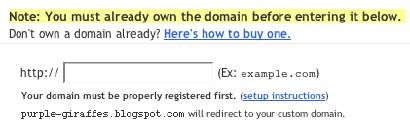
It appears that Blogger checks out your domain name, and if it points to somewhere other than "ghs.google.com", responds with
Another blog is already hosted at this address.If you get that response, verify the IP address of your domain, by pinging. If the ping comes back with
Pinging ghs.l.google.com [64.233.179.121] with 32 bytes of data:
Reply from 64.233.179.121: bytes=32 time=93ms TTL=245
Reply from 64.233.179.121: bytes=32 time=111ms TTL=245
Reply from 64.233.179.121: bytes=32 time=116ms TTL=245
Reply from 64.233.179.121: bytes=32 time=116ms TTL=245
or the like, your domain is ready. Otherwise, you need to wait until it is ready. Or face getting
Another blog is already hosted at this address.
A Possible Problem With The .Info TLD?
Jon Anderson writes
In a nutshell, it doesn't work with the TLD (top-level domain) of .info. More than one person is experiencing, and writing about, this problem.Maybe a timing issue with the .Info TLD servers? I hope this one isn't just solved in silence.
(Edit 2/4): Blogger Buzzer states that
Currently .info doamins are disallowed due to the large number of spam blogs on these kind of domains.
Don't republish straight from FTP to a Custom Domain.
When you republish your blog from Blog*Spot to a custom domain, the blogspot URL of the blog is forwarded to the custom domain. So the blog starts out with the "xxx.blogspot.com" address.
When you have a blog published to an address outside of Blog*Spot, using FTP, then republished to a custom domain, you don't have a corresponding Blog*Spot URL - just the external address that you have just forwarded to "ghs.google.com". So what gets forwarded? Apparently nothing, and that may be a problem.
So, before you publish to a custom domain, take your FTP blog, and publish it back to a Blog*Spot URL. Blogger will forward the Blog*Spot URL to the custom domain, when you republish the blog to the custom domain.
Blogger Plus blogs can't be published to a Custom Domain.
Blogger Buzzer explicitly states that
Unfortunately currently there is a limitation that plus blogs cannot be converted to be served from a custom domain.
>> Top
Friday, January 05, 2007
Custom Domain Names Hosted By Blogger
Up to now, if you wanted a blog (web site) named myblog, you had 2 choices.
- Setup myblog.blogspot.com, hosted by Blog*Spot, and with all of the shiny features of (now) New Blogger.
- Setup myblog.com (myblog.org, ...), hosted by a host of your choice (and extra cost in most cases), but with less features than a Blog*Spot hosted blog.
Note: This post has been migrated (and significantly enhanced) as The Real Blogger Status: Custom Domain Names Hosted By Blogger.
Now, there is a third choice. Setup myblog.com (myblog.org, ...), hosted by Blog*Spot.
- You pay for the DNS listing, which tells your reader's computers where your blog is.
- You setup a DNS entry, pointing "myblog.com" to "ghs.google.com".
- You setup Blogger to publish to the custom domain.
This solution has its good, and its bad, points.
- The Good:
- Save money. No need for an extra cost hosting service.
- All of the shiny features of New Blogger.
- None of the unstable publishing problems, reported of late.
- Your current Blog*Spot address will continue to work, and to forward to your new, custom domain.
- No more abandoned Blog*Spot address, and no more subsequent splog hijackings.
- The Bad:
- If you opted for external publishing to get away from Blog*Spot hosting, this isn't for you.
- If your domain contains more than a blog - ie maybe a chat room or FTP server, this may be a problem. You have two possibilities here.
- Have two named domains - one inside Blog*Spot, the other outside, and links between the two.
- Setup a subdomain DNS record, pointing to "ghs.google.com". Make sure that all of the links between the website and the blog are absolute, ie "http://myblog.mydomain.com", rather than "/blog".
(Note 1/16): There's a lot of theory here. See Google Custom Domain - Case Study #1 for an actual exploration of the facts. And see Setting Up A Custom Domain? Here's Advice, for a review of the essential steps that you must follow.
>> Top
Subscribe to:
Posts (Atom)


