Welcome to The Real Blogger Status - Beta. Please note the warnings (as of 6/13: 0 active), and the alerts (as of 1/10/2007: 5 active).

Please be aware of the naming variances in this blog. You will find various references to "Classic" / "Old Template 2006" Blogger, and to "Beta" / "New Template 2006" Blogger.
Showing posts with label Migrated Post Plus. Show all posts

Friday, February 09, 2007

Google Custom Domain - The DNS Referral

Of all of the instructions in the process of setting up a Google Custom Domain for your Blogger blog, none seems to generate so much confusion as setting up the DNS Referral. The instruction itself is so simple,

Add a "CNAME" record. Point "www.yourdomain.com" to "ghs.google.com". And leave the "NS" records to be maintained by your DNS provider.


(Note): This post has been migrated to The Real Blogger Status: The Google Custom Domain Setup - The DNS Referral.

But why a "CNAME" record? And why "ghs.google.com"?
  • The host "ghs.google.com" is a load balancing server array. When the reader's DNS client asks for the address of "ghs.google.com", it gets the address of whatever server is available right now.
  • In order for you to refer DNS traffic for "yourdomain.com" to "ghs.google.com", rather than to "64.233.179.121" (among many possibilities), you have to use a "CNAME" record. An Address ("A") record will only point to an IP address; to point to a host name you must use a Canonical Name ("CNAME") record.
When a reader of your blog points his browser in your direction, he is referred to "ghs.google.com".

The host "ghs.google.com" then provides a specific IP address, pointing to the single server that will be used to serve your blog to this reader. Another reader for your blog will be accessing it thru a different IP address, using another server. This is called "load balancing". If one readers accesses your blog thru server "D", another reader may access it thru server "F", and a third thru server "G". If server "B" is down, "ghs.google.com" won't offer it for referral. Other readers of other blogs may be using servers "A", "C", and "E" at the same time.

Google provides a load balancing server array, to give your readers the best possible experience. Use the array, not a single server, nor a URL referral. Or prepare for complaints
Gee, your blog performance sucks.


>> Top

Monday, January 15, 2007

Google Custom Domain - Case Study #1

OK, Chuck. Time to put your money where your mouth is.


I've been writing about Google Custom Domains for almost a week now.

So, it's time to test what I've learned.

(Note): This post has been migrated to The Real Blogger Status: Google Custom Domain - Case Study #1, and has been substantially expanded in The Real Blogger Status: Diagnosing Problems With Custom Domains, and in the series The Real Blogger Status: Custom Domains Diagnoses.

This case study uses my church website, martinezumc.org, with DNS service provided by GoDaddy. So, I logged in to the GoDaddy control panel, and followed the Google GoDaddy instructions (instructions for other hosting services are also in that document). Steps 1 - 4 were on target. So, I document below Steps 5 - 7 of the instructions, which became my steps 1 - 8.

Note that GoDaddy is simply the example that I use here. Blogger provides How do I create a CNAME record for my custom domain?, which provides instructions for half a dozen different popular DNS Hosting companies.

Step 1

The Default GoDaddy Settings


Here we see all DNS entries created by GoDaddy, when "martinezumc.org" was setup originally. All entries point to GoDaddy, using an "A" record equating "@" (the domain root) to "68.178.232.100".

Step 2

Just 2 Quick Changes


  1. I deleted the "A" record pointing the domain to GoDaddy.(See Note 2, below)
  2. I added a "CNAME" record equating "www" to "ghs.google.com".
For more detail about DNS records, see PCMagazine Definition of: DNS records, or FAQs.Org: How DNS Works.
(Note 1): This example is for a domain setup for the ".org" TLD, and using GoDaddy as the registrar. All experience so far indicates that the different TLDs (.com, .info, .net, .org, ...), and the different registrars (like GoDaddy) have different rules. Be careful here, and ask questions in Blogger Help Group: How Do I?, if anything here is not completely clear to you. We are still learning the details, and I suspect Blogger staff is too. If you have any doubt about the effectiveness of your DNS setup, execute Step7 below, and proceed only when you get similar results.
(Note 2): If you have an existing website with other content, and just want to add the blog as "blog.mydomain.com", don't delete the "A" record. Just add a "CNAME" record equating "blog" to "ghs.google.com".

Step 3
I Setup Blog Publishing


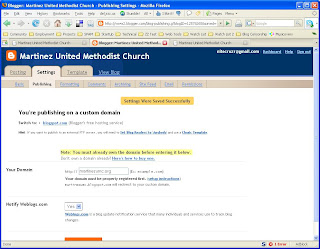
I went into Settings - Publishing for the blog currently published at "martinezumc.blogspot.com", selected "Switch to: Custom Domain", and set it to publish to "martinezumc.org". Note that it clearly warns us
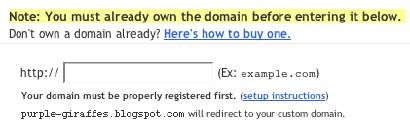
martinezumc.blogspot.com will redirect to your custom domain.
with no mention of www.martinezumc.blogspot.com. This makes it unlikely that we should expect "www.martinezumc.org" to work.

Step 4

I Tested martinezumc .org


Success!

Step 5

I Tested www .martinezumc .org


Here we see just what I predicted, in Step 3, above.

Step 7
And to verify the GoDaddy setup (and diagnose the 404), a simple set of ping tests.
C:\>ping martinezumc.org

Pinging ghs.l.google.com [64.233.179.121] with 32 bytes of data:

Reply from 64.233.179.121: bytes=32 time=94ms TTL=242
Reply from 64.233.179.121: bytes=32 time=92ms TTL=242
Reply from 64.233.179.121: bytes=32 time=94ms TTL=242

Ping statistics for 64.233.179.121:
Packets: Sent = 4, Received = 4, Lost = 0 (0% loss),
Approximate round trip times in milli-seconds:
Minimum = 92ms, Maximum = 94ms, Average = 93ms

C:\>ping www.martinezumc.org

Pinging ghs.l.google.com [66.249.81.121] with 32 bytes of data:

Reply from 66.249.81.121: bytes=32 time=94ms TTL=242
Reply from 66.249.81.121: bytes=32 time=93ms TTL=242
Reply from 66.249.81.121: bytes=32 time=96ms TTL=242

Ping statistics for 66.249.81.121:
Packets: Sent = 4, Received = 4, Lost = 0 (0% loss),
Approximate round trip times in milli-seconds:
Minimum = 93ms, Maximum = 96ms, Average = 94ms


And there is a demonstration of the dynamic name resolution of "ghs.google.com".
64.233.179.121
hs-in-f121.google.com
66.249.81.121
bx-in-f121.google.com


And, seeing as "www.martinezumc.org" resolves properly, in this example to "66.249.81.121", we can conclude that the 404 above is coming from Google, not GoDaddy.

The host named "ghs.google.com" is a load balanced server array. It's provided to give your readers the best performance possible, when visiting your blog.


And, last but by no means least, the DNS Report for "martinezumc.org".

Please follow me now to the next post in this series.

>> Top

Saturday, January 06, 2007

Setup Your Google Custom Domain Name Properly

To let you have your blog using a custom domain name (not yourblog.blogspot.com), but without most of the drawbacks of a New Blogger blog published externally, Blogger now provides custom domain names, where you can have, besides yourblog.blogspot.com, yourblog.com.

(Note): This post has been migrated to (and improved in) The Real Blogger Status: Setup Your Google Custom Domain Name Properly.

To setup a custom domain name, you simply

  • Setup DNS (at your expense) to point your blog's URL to a Blogger server.
  • Setup your blog to publish to the custom domain.


Like all Blogger products, this one is a little Beta still.

Don't Cause A Redirect Loop
If you currently have your blog hosted as yourblog.blogspot.com, and you republish it as yourblog.com, Blogger will even maintain yourblog.blogspot.com for you, and forward all traffic to yourblog.com. And there is one problem.

If you observe my advice for transferring your blog to external publishing, you'll create a stub blog as yourblog.blogspot.com, and you'll setup a forwarding from the stub blog (either a manual link, or an automatic redirect) to yourblog.com.

In some cases, you might try the reverse. Maybe put your blog on yourblog.blogspot.com, and forward traffic from yourblog.com to yourblog.blogspot.com. This, however, is not a good idea. If you setup an automatic redirect from yourblog.com to yourblog.blogspot.com, then publish a second blog to your custom domain yourblog.com, your readers will watch their browsers try to load yourblog.com, which will redirect to yourblog.blogspot.com, which will then redirect to yourblog.com. And so on.

So, if you are going to publish to a Google Custom Domain, forget about the stub blog. Blogger will handle that for you.


Wait Until DNS Points To Google
In Blogger Help: How do I use a custom domain name on my blog?, we see

It appears that Blogger checks out your domain name, and if it points to somewhere other than "ghs.google.com", responds with
Another blog is already hosted at this address.
If you get that response, verify the IP address of your domain, by pinging. If the ping comes back with
Pinging ghs.l.google.com [64.233.179.121] with 32 bytes of data:

Reply from 64.233.179.121: bytes=32 time=93ms TTL=245
Reply from 64.233.179.121: bytes=32 time=111ms TTL=245
Reply from 64.233.179.121: bytes=32 time=116ms TTL=245

or the like, your domain is ready. Otherwise, you need to wait until it is ready. Or face getting
Another blog is already hosted at this address.

A Possible Problem With The .Info TLD?
Jon Anderson writes
In a nutshell, it doesn't work with the TLD (top-level domain) of .info. More than one person is experiencing, and writing about, this problem.
Maybe a timing issue with the .Info TLD servers? I hope this one isn't just solved in silence.

(Edit 2/4): Blogger Buzzer states that
Currently .info doamins are disallowed due to the large number of spam blogs on these kind of domains.


Don't republish straight from FTP to a Custom Domain.
When you republish your blog from Blog*Spot to a custom domain, the blogspot URL of the blog is forwarded to the custom domain. So the blog starts out with the "xxx.blogspot.com" address.

When you have a blog published to an address outside of Blog*Spot, using FTP, then republished to a custom domain, you don't have a corresponding Blog*Spot URL - just the external address that you have just forwarded to "ghs.google.com". So what gets forwarded? Apparently nothing, and that may be a problem.

So, before you publish to a custom domain, take your FTP blog, and publish it back to a Blog*Spot URL. Blogger will forward the Blog*Spot URL to the custom domain, when you republish the blog to the custom domain.

Blogger Plus blogs can't be published to a Custom Domain.
Blogger Buzzer explicitly states that
Unfortunately currently there is a limitation that plus blogs cannot be converted to be served from a custom domain.


>> Top

Friday, January 05, 2007

Custom Domain Names Hosted By Blogger

Up to now, if you wanted a blog (web site) named myblog, you had 2 choices.

  1. Setup myblog.blogspot.com, hosted by Blog*Spot, and with all of the shiny features of (now) New Blogger.
  2. Setup myblog.com (myblog.org, ...), hosted by a host of your choice (and extra cost in most cases), but with less features than a Blog*Spot hosted blog.


Note: This post has been migrated (and significantly enhanced) as The Real Blogger Status: Custom Domain Names Hosted By Blogger.

Now, there is a third choice. Setup myblog.com (myblog.org, ...), hosted by Blog*Spot.
  1. You pay for the DNS listing, which tells your reader's computers where your blog is.
  2. You setup a DNS entry, pointing "myblog.com" to "ghs.google.com".
  3. You setup Blogger to publish to the custom domain.
(Note): Set the domain up carefully.

This solution has its good, and its bad, points.
  • The Good:
    • Save money. No need for an extra cost hosting service.
    • All of the shiny features of New Blogger.
    • None of the unstable publishing problems, reported of late.
    • Your current Blog*Spot address will continue to work, and to forward to your new, custom domain.
    • No more abandoned Blog*Spot address, and no more subsequent splog hijackings.
  • The Bad:
    • If you opted for external publishing to get away from Blog*Spot hosting, this isn't for you.
    • If your domain contains more than a blog - ie maybe a chat room or FTP server, this may be a problem. You have two possibilities here.
      • Have two named domains - one inside Blog*Spot, the other outside, and links between the two.
      • Setup a subdomain DNS record, pointing to "ghs.google.com". Make sure that all of the links between the website and the blog are absolute, ie "http://myblog.mydomain.com", rather than "/blog".


(Note 1/16): There's a lot of theory here. See Google Custom Domain - Case Study #1 for an actual exploration of the facts. And see Setting Up A Custom Domain? Here's Advice, for a review of the essential steps that you must follow.

>> Top