Welcome to The Real Blogger Status - Beta. Please note the warnings (as of 6/13: 0 active), and the alerts (as of 1/10/2007: 5 active).

Please be aware of the naming variances in this blog. You will find various references to "Classic" / "Old Template 2006" Blogger, and to "Beta" / "New Template 2006" Blogger.

Tuesday, January 09, 2007

Monolithic Errors

Long ago, on a computer that exists only in the memory of its users, you might be running a program and everything would come to a screeching halt. And the system console would print a brief and fearsome message

MLTP EAC


And what that cryptic message told you was that you were done. You had done something so stupid, that the computer, with even its infinite (!!) wisdom, could not recover. There were only 2 actions possible now.
  • Power the computer off, and back on, and restart. And pray.
  • Call the IBM Service Engineer.
And neither action was guaranteed to be 100% effective. But for a MLTP EAC, those were the choices.

Later, when Microsoft Windows was just becoming the dominant operating system on personal computers, it was even more unstable than it is now. If you had just installed new code, or tweaked the system settings to unacceptable values, occasionally the system would likewise throw up its hands in anguish and refuse to go any farther.

That was called a Black Screen Of Death. Unlike its predecessor, the MLTP EAC, the BSOD provided a puzzling series of letters and numbers, that could be translated by your super geek in residence (were you so lucky to have one) to indicate that your hard drive had died, or that you had loaded a bad driver for the latest installed accessory card.

In the newer Windows, Windows NT, 2000, XP, and now Vista, the black screen of death was replaced by something just a bit more user friendly, the Blue Screen Of Death. Using the official colour Microsoft Blue, you're told, in a more friendly way
Your're Done.


With Blogger, we are recently seeing two monolithic errors too.
  • 404 Page Not Found.
  • We're sorry, but we were unable to complete your request.
This puts us in mind of the old
MLTP EAC


If there's anything in the Blogger experience that causes FUD, it's these two errors. When you see one, there's nothing you can do but fill out yet another problem report, and join the gang at Google Blogger Help - Troubleshooting.

Doing the former, you fill out a form, and wait for botmail in your Inbox. After you reply to the botmail, you wait some more. Maybe one day things will start working again, and maybe not. After a while, you move to the latter.

In Google Blogger Help - Troubleshooting, troubleshooting is slightly more interactive. There, you describe your problem, and one of the Google employees who occasionally enters the forum will ask a few questions to diagnose the problem. If you're lucky, an answer may be in the latter article.

If you are lucky, a Google employee will later reply in your thread
You're good to go.
Another monolithic response for sure.

You check your blog, and it's working.

Now, both the Black Screen Of Death, and the subsequent Blue Screen Of Death, offered just a small bit of detail. Detail that let you diagnose the problem, and at least decide whether you might have caused the problem by installing a bad driver, or a memory module just went belly up. At least save you the time spent downloading and installing a new driver, when you should be traveling to the nearby computer store for another memory module.

With the current "Page not found / unable to complete your request" messages, we're back to the MLTP EAC level. Nothing to do but call the engineer.

We need the ability to figure out what we are doing wrong. Without knowing whats going wrong, any of us may be subject to either problem, at any time. And that is the FUD.

Let me put this briefly.
We need to know what is going on, so we can avoid causing the problem.
Right now, all we know is
We are using Blogger as a web site.
And the only way to predictably avoid the problem is
Don't use Blogger as a web site.
As solutions go, this one sucks. Please give us just a bit more diagnostic detail, instead of
I'm sorry Dave, I'm afraid I can't do that.


Come on, Blogger, admit the errors, so we can avoid making the same ones over and over. Don't make Blogger like the Sword Of Damocles.

(Note 2/1): Please tell us that the below mentioned fix wasn't the one applied 1/31 late evening!!??

(Note 1/11): Blogger Buzzer states
Your blog is affected by a bug that hit others also and it is being worked on. Expect a fix in the next few days.


>> Top

Monday, January 08, 2007

Another Cache Refresh Needed?

From some of the problem reports in Blogger Help Group: Login Issues, it appears that some login scripts may have been changed again.

As in Blogger Alert 12/2: Missing Toolbar Buttons, if you're having any problems logging in, or if you're missing your blogs in your dashboard, you might want to try clearing cache and cookies again.

(Edit 1/31): The bX-68tbuv problem with image uploads, which appears to be related to this issue, has been fixed. Here's a definition of the lack of uniformity of the problem - this specific problem was unique to sessions starting from "beta.blogger.com".

This has been fixed. Regardless, use www.blogger.com and not beta.blogger.com.


>> Top

Blogger Maintenance January 9 Morning

In Blogger Help Group: Scheduled Blogger Outage Tuesday, January 9th, 2007, Helper warns us

Just wanted to give you all a heads-up that the old Blogger will be down for a couple hours tomorrow (Tuesday, January 9th, 2007). This scheduled outage applies to the old Blogger from 7:45am-9:45am PST. You will not be able to post to old Blogger blogs or access any old Blogger blogs on Blog*Spot during this time. We also will not be allowing any new accounts or new blogs to be created on the new Blogger during this outage. Google Groups will be also be undergoing planned maintenance on Tuesday the 9th. Accordingly, some features may be temporarily unavailable (including the Blogger Help Group).

Old Blogger, New Blogger, and Blogger Help Group all down at the same time. Might be a good day to take off.

>> Top

Saturday, January 06, 2007

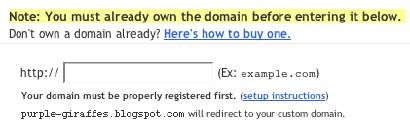
Setup Your Google Custom Domain Name Properly

To let you have your blog using a custom domain name (not yourblog.blogspot.com), but without most of the drawbacks of a New Blogger blog published externally, Blogger now provides custom domain names, where you can have, besides yourblog.blogspot.com, yourblog.com.

(Note): This post has been migrated to (and improved in) The Real Blogger Status: Setup Your Google Custom Domain Name Properly.

To setup a custom domain name, you simply

  • Setup DNS (at your expense) to point your blog's URL to a Blogger server.
  • Setup your blog to publish to the custom domain.


Like all Blogger products, this one is a little Beta still.

Don't Cause A Redirect Loop
If you currently have your blog hosted as yourblog.blogspot.com, and you republish it as yourblog.com, Blogger will even maintain yourblog.blogspot.com for you, and forward all traffic to yourblog.com. And there is one problem.

If you observe my advice for transferring your blog to external publishing, you'll create a stub blog as yourblog.blogspot.com, and you'll setup a forwarding from the stub blog (either a manual link, or an automatic redirect) to yourblog.com.

In some cases, you might try the reverse. Maybe put your blog on yourblog.blogspot.com, and forward traffic from yourblog.com to yourblog.blogspot.com. This, however, is not a good idea. If you setup an automatic redirect from yourblog.com to yourblog.blogspot.com, then publish a second blog to your custom domain yourblog.com, your readers will watch their browsers try to load yourblog.com, which will redirect to yourblog.blogspot.com, which will then redirect to yourblog.com. And so on.

So, if you are going to publish to a Google Custom Domain, forget about the stub blog. Blogger will handle that for you.


Wait Until DNS Points To Google
In Blogger Help: How do I use a custom domain name on my blog?, we see

It appears that Blogger checks out your domain name, and if it points to somewhere other than "ghs.google.com", responds with
Another blog is already hosted at this address.
If you get that response, verify the IP address of your domain, by pinging. If the ping comes back with
Pinging ghs.l.google.com [64.233.179.121] with 32 bytes of data:

Reply from 64.233.179.121: bytes=32 time=93ms TTL=245
Reply from 64.233.179.121: bytes=32 time=111ms TTL=245
Reply from 64.233.179.121: bytes=32 time=116ms TTL=245

or the like, your domain is ready. Otherwise, you need to wait until it is ready. Or face getting
Another blog is already hosted at this address.

A Possible Problem With The .Info TLD?
Jon Anderson writes
In a nutshell, it doesn't work with the TLD (top-level domain) of .info. More than one person is experiencing, and writing about, this problem.
Maybe a timing issue with the .Info TLD servers? I hope this one isn't just solved in silence.

(Edit 2/4): Blogger Buzzer states that
Currently .info doamins are disallowed due to the large number of spam blogs on these kind of domains.


Don't republish straight from FTP to a Custom Domain.
When you republish your blog from Blog*Spot to a custom domain, the blogspot URL of the blog is forwarded to the custom domain. So the blog starts out with the "xxx.blogspot.com" address.

When you have a blog published to an address outside of Blog*Spot, using FTP, then republished to a custom domain, you don't have a corresponding Blog*Spot URL - just the external address that you have just forwarded to "ghs.google.com". So what gets forwarded? Apparently nothing, and that may be a problem.

So, before you publish to a custom domain, take your FTP blog, and publish it back to a Blog*Spot URL. Blogger will forward the Blog*Spot URL to the custom domain, when you republish the blog to the custom domain.

Blogger Plus blogs can't be published to a Custom Domain.
Blogger Buzzer explicitly states that
Unfortunately currently there is a limitation that plus blogs cannot be converted to be served from a custom domain.


>> Top

Friday, January 05, 2007

New Blogger Image Test


A new test


This is a new version of my Old Blog post Image Test.


<a onblur="try {parent.deselectBloggerImageGracefully();} catch(e) {}" href="http://3.bp.blogspot.com/
_iIC50Wn48vI/RZ7LHeuVPWI/AAAAAAAAAB8/qc5E_qN9tZ8/
s1600-h/Check+This+Out+2.gif"><img style="float:left; margin:0 10px 10px 0;cursor:pointer; cursor:hand;" src="http://3.bp.blogspot.com/
_iIC50Wn48vI/RZ7LHeuVPWI/AAAAAAAAAB8/qc5E_qN9tZ8/
s200/Check+This+Out+2.gif" border="0" alt=""id="BLOGGER_PHOTO_ID_5016670364304227682" /></a>A new test
<br clear=left>
This is a new version of my Old Blog post <a href="http://bloggerstatusforreal.blogspot.com/
2006/07/image-test.html"><span style="font-style:italic;">Image Test</span></a>.


>> Top