
Welcome to The Real Blogger Status - Beta. Please note the warnings (as of 6/13: 0 active), and the alerts (as of 1/10/2007: 5 active).

Please be aware of the naming variances in this blog. You will find various references to "Classic" / "Old Template 2006" Blogger, and to "Beta" / "New Template 2006" Blogger.

Saturday, January 06, 2007

Setup Your Google Custom Domain Name Properly

To let you have your blog using a custom domain name (not yourblog.blogspot.com), but without most of the drawbacks of a New Blogger blog published externally, Blogger now provides custom domain names, where you can have, besides yourblog.blogspot.com, yourblog.com.

(Note): This post has been migrated to (and improved in) The Real Blogger Status: Setup Your Google Custom Domain Name Properly.

To setup a custom domain name, you simply

  • Setup DNS (at your expense) to point your blog's URL to a Blogger server.
  • Setup your blog to publish to the custom domain.


Like all Blogger products, this one is a little Beta still.

Don't Cause A Redirect Loop
If you currently have your blog hosted as yourblog.blogspot.com, and you republish it as yourblog.com, Blogger will even maintain yourblog.blogspot.com for you, and forward all traffic to yourblog.com. And there is one problem.

If you observe my advice for transferring your blog to external publishing, you'll create a stub blog as yourblog.blogspot.com, and you'll setup a forwarding from the stub blog (either a manual link, or an automatic redirect) to yourblog.com.

In some cases, you might try the reverse. Maybe put your blog on yourblog.blogspot.com, and forward traffic from yourblog.com to yourblog.blogspot.com. This, however, is not a good idea. If you setup an automatic redirect from yourblog.com to yourblog.blogspot.com, then publish a second blog to your custom domain yourblog.com, your readers will watch their browsers try to load yourblog.com, which will redirect to yourblog.blogspot.com, which will then redirect to yourblog.com. And so on.

So, if you are going to publish to a Google Custom Domain, forget about the stub blog. Blogger will handle that for you.


Wait Until DNS Points To Google
In Blogger Help: How do I use a custom domain name on my blog?, we see
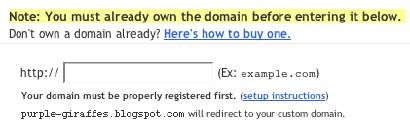
It appears that Blogger checks out your domain name, and if it points to somewhere other than "ghs.google.com", responds with
Another blog is already hosted at this address.
If you get that response, verify the IP address of your domain, by pinging. If the ping comes back with
Pinging ghs.l.google.com [64.233.179.121] with 32 bytes of data:

Reply from 64.233.179.121: bytes=32 time=93ms TTL=245
Reply from 64.233.179.121: bytes=32 time=111ms TTL=245
Reply from 64.233.179.121: bytes=32 time=116ms TTL=245

or the like, your domain is ready. Otherwise, you need to wait until it is ready. Or face getting
Another blog is already hosted at this address.

A Possible Problem With The .Info TLD?
Jon Anderson writes
In a nutshell, it doesn't work with the TLD (top-level domain) of .info. More than one person is experiencing, and writing about, this problem.
Maybe a timing issue with the .Info TLD servers? I hope this one isn't just solved in silence.

(Edit 2/4): Blogger Buzzer states that
Currently .info doamins are disallowed due to the large number of spam blogs on these kind of domains.


Don't republish straight from FTP to a Custom Domain.
When you republish your blog from Blog*Spot to a custom domain, the blogspot URL of the blog is forwarded to the custom domain. So the blog starts out with the "xxx.blogspot.com" address.

When you have a blog published to an address outside of Blog*Spot, using FTP, then republished to a custom domain, you don't have a corresponding Blog*Spot URL - just the external address that you have just forwarded to "ghs.google.com". So what gets forwarded? Apparently nothing, and that may be a problem.

So, before you publish to a custom domain, take your FTP blog, and publish it back to a Blog*Spot URL. Blogger will forward the Blog*Spot URL to the custom domain, when you republish the blog to the custom domain.

Blogger Plus blogs can't be published to a Custom Domain.
Blogger Buzzer explicitly states that
Unfortunately currently there is a limitation that plus blogs cannot be converted to be served from a custom domain.


>> Top

Friday, January 05, 2007

New Blogger Image Test


A new test


This is a new version of my Old Blog post Image Test.


<a onblur="try {parent.deselectBloggerImageGracefully();} catch(e) {}" href="http://3.bp.blogspot.com/
_iIC50Wn48vI/RZ7LHeuVPWI/AAAAAAAAAB8/qc5E_qN9tZ8/
s1600-h/Check+This+Out+2.gif"><img style="float:left; margin:0 10px 10px 0;cursor:pointer; cursor:hand;" src="http://3.bp.blogspot.com/
_iIC50Wn48vI/RZ7LHeuVPWI/AAAAAAAAAB8/qc5E_qN9tZ8/
s200/Check+This+Out+2.gif" border="0" alt=""id="BLOGGER_PHOTO_ID_5016670364304227682" /></a>A new test
<br clear=left>
This is a new version of my Old Blog post <a href="http://bloggerstatusforreal.blogspot.com/
2006/07/image-test.html"><span style="font-style:italic;">Image Test</span></a>.


>> Top

Custom Domain Names Hosted By Blogger

Up to now, if you wanted a blog (web site) named myblog, you had 2 choices.

  1. Setup myblog.blogspot.com, hosted by Blog*Spot, and with all of the shiny features of (now) New Blogger.
  2. Setup myblog.com (myblog.org, ...), hosted by a host of your choice (and extra cost in most cases), but with less features than a Blog*Spot hosted blog.


Note: This post has been migrated (and significantly enhanced) as The Real Blogger Status: Custom Domain Names Hosted By Blogger.

Now, there is a third choice. Setup myblog.com (myblog.org, ...), hosted by Blog*Spot.
  1. You pay for the DNS listing, which tells your reader's computers where your blog is.
  2. You setup a DNS entry, pointing "myblog.com" to "ghs.google.com".
  3. You setup Blogger to publish to the custom domain.
(Note): Set the domain up carefully.

This solution has its good, and its bad, points.
  • The Good:
    • Save money. No need for an extra cost hosting service.
    • All of the shiny features of New Blogger.
    • None of the unstable publishing problems, reported of late.
    • Your current Blog*Spot address will continue to work, and to forward to your new, custom domain.
    • No more abandoned Blog*Spot address, and no more subsequent splog hijackings.
  • The Bad:
    • If you opted for external publishing to get away from Blog*Spot hosting, this isn't for you.
    • If your domain contains more than a blog - ie maybe a chat room or FTP server, this may be a problem. You have two possibilities here.
      • Have two named domains - one inside Blog*Spot, the other outside, and links between the two.
      • Setup a subdomain DNS record, pointing to "ghs.google.com". Make sure that all of the links between the website and the blog are absolute, ie "http://myblog.mydomain.com", rather than "/blog".


(Note 1/16): There's a lot of theory here. See Google Custom Domain - Case Study #1 for an actual exploration of the facts. And see Setting Up A Custom Domain? Here's Advice, for a review of the essential steps that you must follow.

>> Top

Wednesday, January 03, 2007

Another Cookie Issue

Previously, we discovered a possible problem with Blogger and third party cookies. That could, potentially, affect all Bloggers, but only temporarily. As everybody adjusts to New Blogger, so should their computers, and the problems should go away.

But login problems, frequently looking like they might involve cookies, surface daily. New Blogger was publicised on 12/19, and two weeks later, the login problems don't seem to be going away all that quickly.

Maybe there's another problem, and maybe it involves the wording in instructions about permitting cookies.

Jordan, in login trouble - wont remember me, provides a long forgotten link to Known Issues for the New Blogger: The “Remember Me” login option will not work, where we are advised, when configuring Internet Explorer, to

...add google.com to the list of allowed sites under Internet Options > Privacy.
I wonder how many folks added "www.blogger.com", rather than "blogger.com", based upon the Firefox and Internet Explorer wizards
Type the exact address of the website...
I know that I become confused by that instruction.

Now, the article The “Remember Me” login option will not work specifically mentions Internet Explorer V6 as a problem, and Firefox is implied to be free from this problem. The date of that article is 9/5/2006. Firefox V2, and Internet Explorer V7, came out almost 2 months later.

FF V1.5 and IE V6, by and large, used "permit by default, deny on demand" security strategies. FF V2 and IE V7, on the other hand, use "deny by default, permit on demand" strategies, and are more likely to present a problem with incorrectly permitted cookies.

In short, for both Firefox and Internet Explorer, check your Cookies permissions. Make sure that you are allowing "blogger.com", rather than "www.blogger.com", to add cookies to your computer.

For more insight into the cookie issue, see Roberto's Report: Another Cookie, anyone?.

>> Top

Tuesday, January 02, 2007

Publicising Your New Blogger Blog

Publicising your blog, in general, means submitting it to the search engines. There are some significant differences between Old Template and New Template (Layouts) Blogger blogs.

Get Indexed By The Search Engines
As with an old template blog, there are 3 default Blogger values, which describe your blog to any search engine spider.

  • $BlogPageTitle$
  • $BlogMetaData$
  • $BlogTitle$

In a new template blog, they're found in roughly the same place, but coded differently.
  • <title><data:blog.pageTitle/></title>
  • <b:include data='blog' name='all-head-content'/>
    <b:skin><![CDATA[/*
  • <div id='header-wrapper'>
    <b:section class='header' id='header' maxwidgets='1' showaddelement='no'>
    <b:widget id='HTML4' locked='false' title='' type='HTML'/>
    </b:section>
    </div>


What you'll end up with, at the top of the blog, will be roughly similar.

<title><data:blog.pageTitle/></title>
<meta content='The Real Blogger Status: What Blogger
Won"t Tell You' name='description'/>
<meta content='Blogger, Blogspot, blogger.com,
blogspot.com, outage, maintenance, inconvenience...
Permission Denied,' name='keywords'/>
<b:include data='blog' name='all-head-content'/>
<b:skin><![CDATA[/*


>> Top